
Maintaining an open-source WordPress plugin all by yourself is a challenging task. There is no sprint planning, no code review from colleagues, no one to catch the thing you missed at 11 PM. But most importantly, there is not enough time: it’s something that you do outside your day job, during weekends and holidays. That’s the reason I often end up neglecting my plugins, updating them only when something important comes up.
OOTB OpenStreetMap is one of those plugins, and, even though it doesn’t have many active installations or reviews, it does have a steady stream of support requests and a backlog of issues, mostly about implementing new features. I want to keep it healthy and improve it, but I don’t have the bandwidth to do it the traditional way.
With AI, I saw an opportunity to automate parts of the process. My goal was not just to spend fewer hours on the plugin but to improve the quality of the codebase. To do that, I had to take a step back, free myself from self-imposed restrictions, and try to think more like the alien on the rooftop.
In the end, and after many long sessions with Claude, I came up with a workflow that seems to work well, already allowing me to release two versions within a span of two weeks (or, more precisely, two weekends).
The workflow at a glance
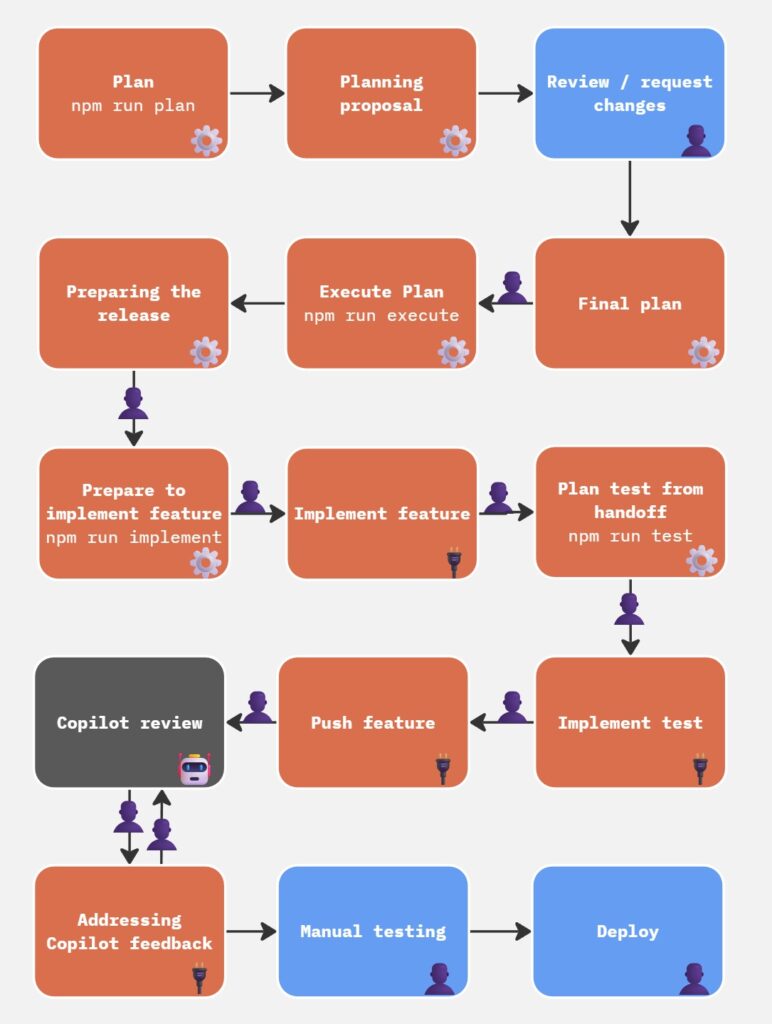
The tooling lives in a separate repository, so the plugin repo stays clean. It is built around a set of Claude Code agent sessions and Node.js scripts that talk to the GitHub API. The core cycle looks like this:
- Plan. Run
npm run plan. The script pulls data from several sources, then a Claude Code session reads the output and drafts a proposal for the next release. I review and approve it.
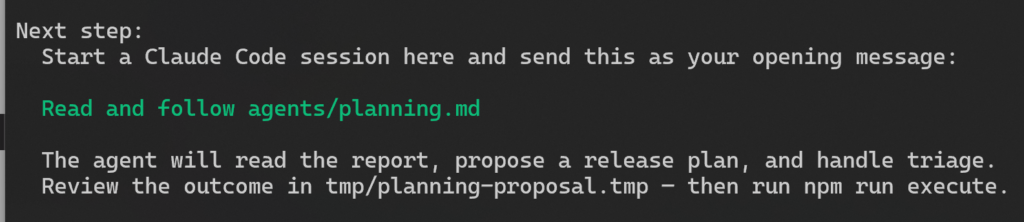
- Execute. Run
npm run execute. The script reads the approved proposal and creates everything: release branch, milestone, PRs, issues, and GitHub Project items. - Implement. Run
npm run implement. The script generates a prompt asking me to select the feature I want to work on, from a list of available PRs (as I build the features, the list narrows down).
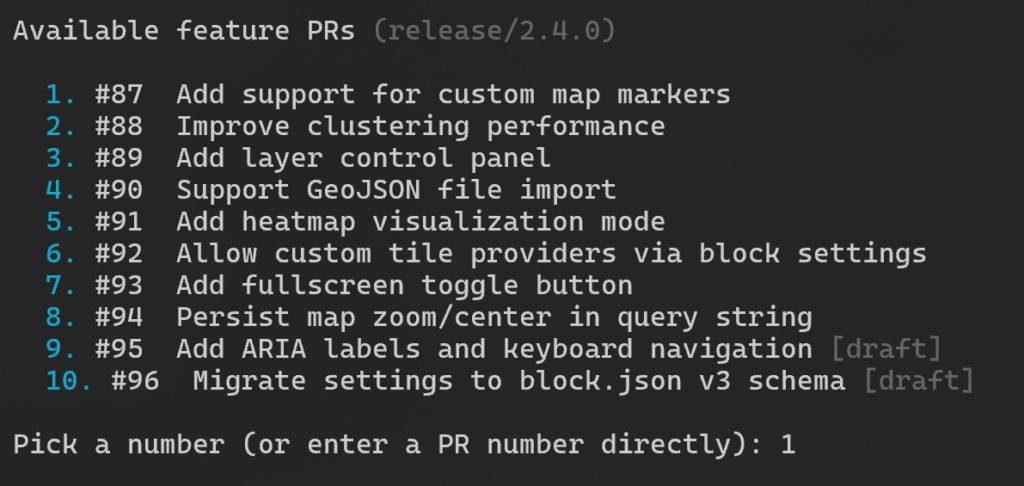
When I select the PR, I see step-by-step instructions on what to do next, which is, pretty much, to open a Claude Code session inside the plugin directory and paste the brief like Read and follow <path_to_brief> (that’s all – Claude takes it from there):
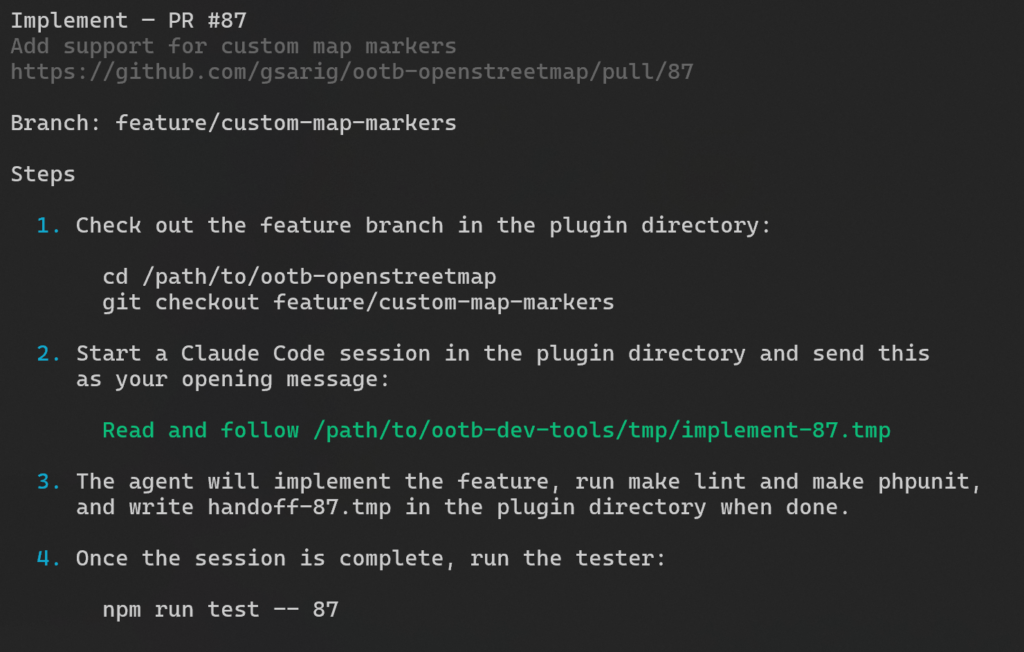
The session implements the feature and writes a structured handoff file when done. All that, using the right feature branches and PRs from the previous step.
- Test. Run
npm run test. The script reads the handoff file and generates a prompt for a separate Claude Code session. This is similar to the earlier prompts, where I direct Claude to a specific md file, with the instructions on how to build the new test. - Write tests. I open a new session in the plugin directory and paste the brief. The session proposes test cases, waits for my confirmation, then implements them and commits them to the feature branch. Every feature that ships has a test written for it.
- Review. GitHub Copilot reviews every PR. This is one of the most time-consuming parts: I have to request the Copilot CR, then wait for it to run, then relay the feedback to a local Claude Code session myself. This is simply a prompt like “Check Copilot’s feedback, fix the issues, reply and resolve”, but I have to paste it manually. I tried to automate this step, but it didn’t work out as well as I hoped (here’s why).
- Release. I do a final manual review and test, then merge the release PR and tag the version. 10up’s WordPress Plugin Deploy action takes it from there and pushes to WordPress.org. No AI involved in these last steps.
It’s worth mentioning that the handoff between steps is deliberate. The implement session writes a structured summary of what it did, what it changed, and what to test. The test session reads that summary before touching anything. The scripts generate task-specific prompts so each session starts with exactly the context it needs, nothing more.
It might look complicated in paper, but in reality it is just me running three commands and following the steps they ask me to do; no need to memorize much.
Testing as the foundation
None of this works without a reliable test suite. Tests are not an afterthought here; they are what makes the whole system safe enough to run with confidence. The implementer session is instructed not to present its work until all tests pass. If something fails, it fixes it and tries again. That means a passing test suite is a precondition for the handoff, not a step the developer has to remember to check.
The plugin has three layers:
- PHPUnit snapshot tests, which render the block’s HTML output and compare it against committed fixture files. These are the contract for what the block produces.
- PHPUnit integration tests, which cover WordPress-specific behaviour: hook registration, asset enqueuing, query filtering.
- Playwright end-to-end tests, which spin up a real WordPress instance and confirm that maps render in the browser and in the block editor.
The snapshot discipline is worth calling out specifically. When a snapshot fails because of an intentional HTML change, the agent session is instructed to stop and report, never to auto-update the fixtures. That friction is the point. A snapshot update is a decision, not a cleanup task.
Every new feature gets its own test. That is a rule baked into the tester agent: read what changed, propose test cases, wait for confirmation, then write them. The proposal step matters. It catches misunderstandings before any code is committed.
The tests are thorough enough so that, if they pass, I can be confident that the new feature is unlikely to introduce regressions. Of course, this doesn’t mean that I will rely solely on the automated tests to deploy. The last step before a deploy is always a manual test to confirm with my own eyes that everything works as expected.
Why a separate session?
The reason tests are written in a separate session, rather than having the implementer continue and do them itself, comes down to bias. The implementer session carries the full weight of its own reasoning: the decisions it made, the assumptions it leaned on, the tradeoffs it accepted. If it writes the tests, it will almost certainly write tests that confirm what it knows it did.
A fresh session that reads only the handoff summary (a structured description of what changed and why, not the full conversation) approaches the code more like an outside reviewer would. It is more likely to notice when the behaviour does not match the stated intent, and more likely to think of cases the implementer did not consider.
The handoff file is the bridge between the two sessions, and having to write it clearly is itself a useful check: if the implementer cannot describe what it did in plain terms, that is a signal worth paying attention to.
What worked
Planning that actually reads the room
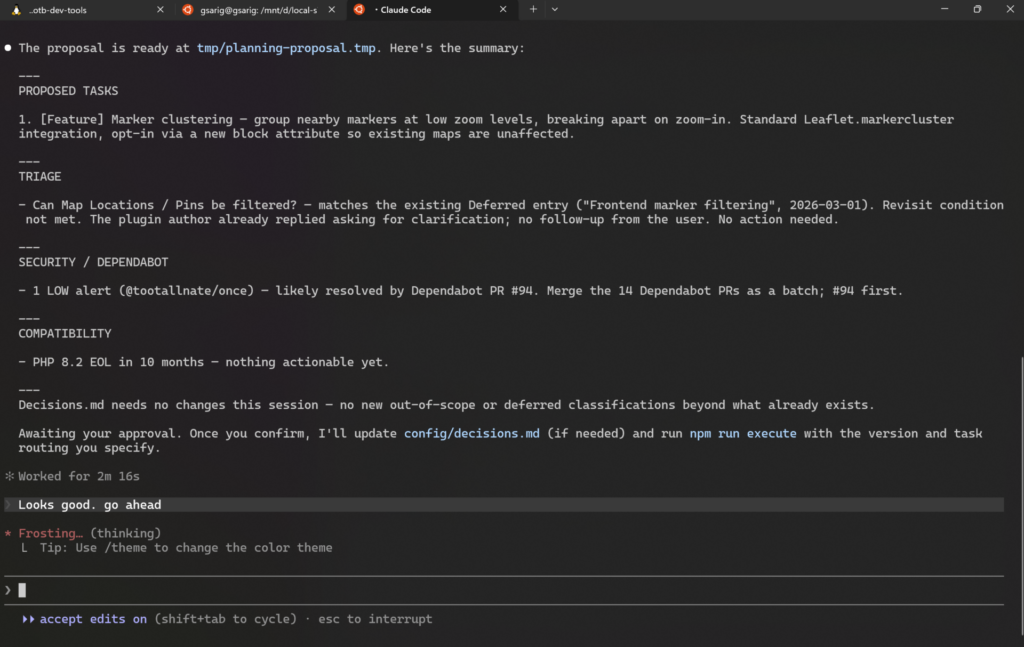
The planning step is where the workflow earns its keep. Before proposing anything for the next release, the script aggregates data from several places:
- Open GitHub issues
- Recent unresolved threads from the WordPress.org support forum (resolved threads are ignored)
- Dependabot security alerts
- An ecosystem snapshot covering WordPress core, Gutenberg, PHP end-of-life dates, and Leaflet.js
- The output of
npm auditandcomposer audit
The forum scraping is particularly useful. It surfaces recurring pain points that never make it to GitHub, questions asked by users who would never open an issue. When three different people in three different threads are struggling with the same thing, that is a signal worth acting on.
The planning agent clusters related items, scores them by frequency and recency, and drafts implementation briefs. I read the proposal, push back where needed, and approve. Only then does the execution step run. The AI researches and proposes; I decide.
Execution that does the grunt work well
Once the plan is approved, npm run execute takes the proposal and creates everything in one pass:
- A release branch and a draft release PR
- A version milestone, assigned to all items
- A feature branch and draft PR per task, each pre-populated with the implementation brief as its description
- A GitHub issue for every backlog item
- A GitHub Project card for each of the above
I used to do some of these by hand, completely omitting others, and I was not very good at it. Branch names were inconsistent, PR descriptions were thin, milestones were missing. The script does it more carefully than I did, every time.
Not everything needs to be AI
One of the more useful lessons from building this was knowing when not to use AI. If something can be done reliably with plain code, it should be. The scripts that pull GitHub issues, scrape forum threads, create branches, and open PRs are all straightforward Node.js, with no AI involved. They do exactly what they are told, every time. AI hallucinates; programmatic automation does not.
AI earns its place in the workflow where judgment is required: deciding what to build, implementing a feature, writing tests, reviewing copy. Anywhere the task is deterministic, a script is the better tool. Keeping that boundary clear makes the whole system more trustworthy.
Copilot as a second set of eyes
GitHub Copilot reviews every PR. It catches things I skim past: unvalidated input, broken async patterns, missing error handling, the occasional logic bug. On a larger feature, you might go several rounds before all the comments are addressed. That is not a flaw in Copilot’s design; it is just how code review works when the reviewer has no cross-round memory. Each round it sees the diff fresh. You have to close the loop yourself.
The right instructions make Copilot less noisy
Out of the box, Copilot will flag things that are not problems: version mismatches between files on a feature branch, configuration choices it interprets as oversights, CI guards it thinks should be removed. Left unchecked, those comments bury the ones that actually matter.
That is where a copilot-instructions.md file comes in handy. Ours tells Copilot what to focus on (correctness, security, reliability), what to skip (style and speculative edge cases, since PHPCS and ESLint already handle the former), and what is intentional and should never be flagged.
That last category matters more than it sounds: version numbers are intentionally mismatched on feature branches and bumped only in the release commit; CI workflow guards are deliberate constraints, not undocumented behaviour; public API hooks are explicitly listed so that any change to them gets flagged as a breaking change rather than a routine edit. Keeping that file current is part of the maintenance work, not a one-time setup task.
What didn’t work
Automating the Copilot fixes
There is a GitHub Actions workflow in the plugin repo that watches for Copilot reviews, sends the comments to the Claude API, and applies the fixes automatically. It is opt-in: it only runs on PRs that have an ai-fix label. It reads the Copilot comments, fetches the relevant files, runs the test suite after each attempt, retries on failure, and only commits if everything passes.
Technically, it works. With a GitHub Pro account, which allows Copilot reviews to trigger workflows automatically, it would even be completely seamless: upon a new push to a PR, Copilot’s review would automatically be triggered, which, in turn, would automatically trigger our action. The action would fix the issues, push the changes, which would trigger a new Copilot review, and so on, until there were no more comments. All that, without requiring my presence: I wouldn’t even have to keep my computer on.
But there is a catch: the fixes that the Claude API produces are noticeably worse than what a local Claude Code session would do.
The reason is context. A local session has the full conversation history, the ability to read any file in the project, the ability to run commands and see their output, and a cumulative understanding of the codebase that builds across the session. The API call has the Copilot comments and the contents of the files those comments touch. That is it.
The result is that the automated fixes tend to be mechanical, addressing the letter of the comment rather than the spirit. Sometimes they introduce new issues. They pass the tests, which is the bar the workflow sets, but they are not the kind of changes you would write yourself.
It was not wasted effort. It clarified something important about where the boundary between “automate this” and “stay in the loop on this” actually sits. Code changes are on the human side of that boundary.
The instructions are a living system
Perhaps one of the most important maintenance task in this whole system is not running the scripts. It is keeping the instructions current.
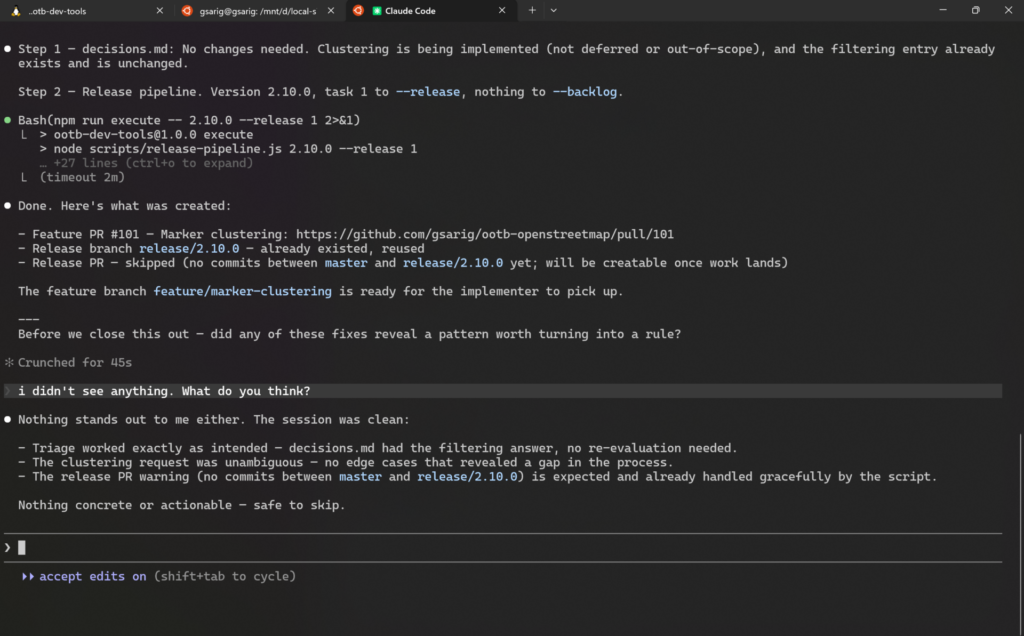
The agent prompts, the Copilot instructions, the CLAUDE.md file in the plugin repo: these are not configuration you set once. They are the accumulated knowledge of every session, every mistake, every pattern you noticed and decided to encode. When a fix reveals a recurring problem, the right response is to ask whether it belongs in the instructions. When Copilot keeps flagging the same thing that is not actually a problem, the right response is to tell it so, explicitly, in copilot-instructions.md.
After each PR, Claude asks: “Did anything in this round reveal a pattern worth turning into a rule?” That question is baked into the instructions, so I don’t have to remember to ask it myself. Most of the time the answer is no. But when the answer is yes, it goes into the instructions so the same issue does not come up again.
This is something that needs caution, though. Instructions that try to anticipate every edge case become noise: the agent spends more effort parsing rules than doing work, and contradictions start to creep in. A good rule earns its place by solving a recurring problem, not by covering a hypothetical one. When in doubt, leave it out and add it only if the problem actually appears.
The whole thing is like a living system. You set it up, use it, and occasionally find that something no longer fits or that a new need has emerged. When that happens, you update the instructions and move on. Those moments become rarer over time as the instructions mature, but they never stop entirely. The important thing is to stay in the habit of noticing them.
What’s next
Assuming I find enough time, my plan is to extend this workflow beyond this plugin to the rest of my WordPress projects and to non‑WordPress work as well, starting with the two Obsidian plugins Sentinel and Varinote.
My working theory is that the same core principles (clear separation of deterministic scripts and AI judgment, test‑first handoffs, and compact instruction files) will transfer with only modest adaptation to different platforms and runtimes. I expect some upfront effort to map platform‑specific tests, CI hooks, and handoff artifacts; a few iterations will be needed as edge cases surface, but I am optimistic that it will be feasible and meaningful.
I guess we’ll have to wait and see.