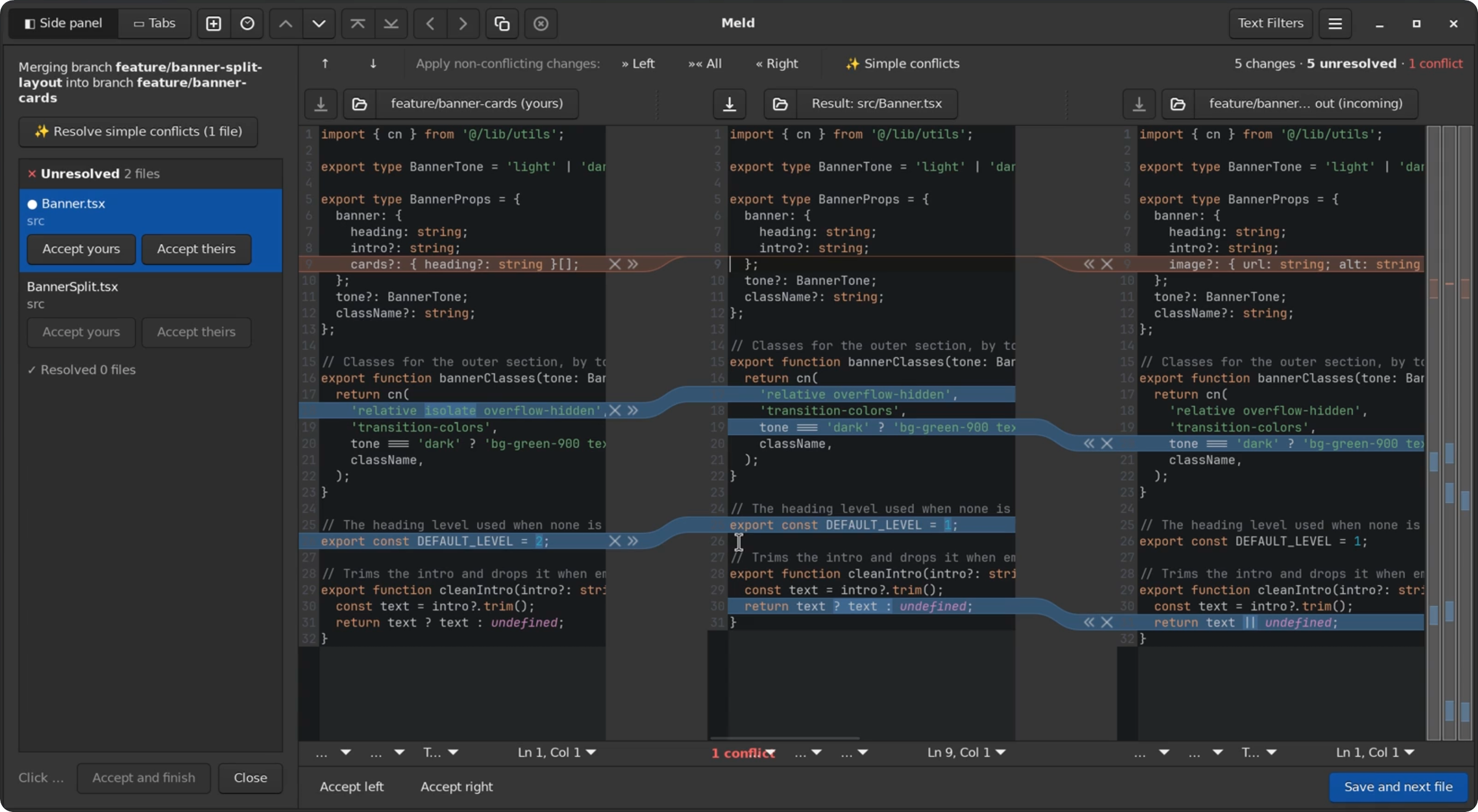
I recently decided to cancel my PhpStorm subscription. I don’t spend as much time in it as I used to (most of my day happens in the terminal nowadays), it was heavy to load, and VS Code is a more than good and much faster alternative, available for free. The one thing I missed, though, was PhpStorm’s tool for resolving merge conflicts.
I never managed to like VS Code’s merge editor: it opens fast, but every time I used it I had to stop and work out which pane was which and what each button would actually do. None of the alternatives I tried were as good as PhpStorm’s either (at least for my preferences). The closest one was Meld, which is free, open source and felt more familiar than the rest, but it was still confusing in places and nowhere near as polished. A three-way merge opens with the result already half-merged, every change shows as a copy from one pane to another, and nothing gives you an overview of the files you still have to resolve.
Patching instead of forking
Building a new merge tool from scratch felt like overkill, and forking Meld would mean maintaining my own copy of it forever. So I tried a third option: keep Meld as it is, and add what I missed as a set of patches on top of a specific release. Meld is written in Python and on Linux it runs straight from its source folder, so the patches go on with a single git am and there’s nothing to build.
The result is meldown. It’s not a fork I have to maintain or a new tool. It’s just Meld plus a patch series (with a git mergetool wrapper and an optional dark theme), and it’s been working very well so far, even if Meld is almost unrecognizable with it. The main changes:
- Apply or dismiss each change. The result starts from the common base, and every change gets an arrow to apply it and an X to dismiss it, much like in PhpStorm.
- Every conflicted file in one list, grouped as Unresolved, Auto-resolved and Resolved, in a side panel or a tab of its own, with Accept yours and Accept theirs per file.
- A one-click toolbar that applies every non-conflicting change from either side, or both.
- Branch names as pane titles, so you don’t have to remember which side is “local” (which, during a rebase, isn’t the one you’d expect).
- A correct exit status for
git mergetool, so git never marks a half-done file as resolved.
What about updates?
The obvious catch is keeping the patches working with new Meld releases. A few years ago that alone would have stopped me, but with AI it’s much easier than it sounds. Moving to a new release means rebasing the patch branch onto the new tag, and if a patch no longer fits, an agent can easily fix the conflicts, with the patches’ own tests to check its work.
It’s Linux only, since that’s where Meld runs from source, but I’m on Windows with WSL2 anyway, so it suits me very well. The README has the setup steps, plus a ready-made prompt for an AI agent if you’d rather let it do the setup for you.
If you want to give it a try, here’s the repo: https://github.com/gsarig/meldown.